
Get in Touch
Learn more about InfoTrackAI
Simply fill in your details and we will be in touch soon.
Start using InfoTrack’s Model Context Protocol
Connect to InfoTrack’s secure MCP in minutes. Use cached demo searches to test the workflow first, then order live searches
through your InfoTrack account when you’re ready. No complex process and hassle free single endpoint
through your InfoTrack account when you’re ready. No complex process and hassle free single endpoint
Create an Account
Get started with InfoTrackAI
Simply fill in your details and we will be in touch soon.
Choose your setup path
Existing InfoTrack client
Connect to the MCP endpoint
Have an InfoTrack account? Use the endpoint below to connect your agent and start placing orders straight away.
MCP Endpoint (Standard)
https://mcp.infotrack.ai/servers/infotrack-all/mcp
MCP Endpoint (Search and Invoke — for limited-context agents)
https://mcp.infotrack.ai/servers/infotrack-all-search-invoke/mcp
Not sure which endpoint to use?
Standard Mode
The full list of available services is presented to your agent on connection. The agent sees every service and can invoke any of them directly. This is the default and works well with capable models that can reason across a broad set of options.
Search and Invoke
If your agent has limited context capacity, or you have a large number of services enabled, the Gateway can expose a lightweight search-first pattern instead. Only a single discovery tool is presented initially. The agent describes what it needs, the Gateway identifies the right service, and the agent then invokes it.
This frees up context for the model and is recommended when working with smaller or more cost-sensitive models, or when the number of available services would otherwise consume significant token budget.
This frees up context for the model and is recommended when working with smaller or more cost-sensitive models, or when the number of available services would otherwise consume significant token budget.
Which should I use? Start with Standard Mode. If you notice your agent struggling with service selection, or you want to reduce token usage, ask your InfoTrack representative to switch to Search and Invoke.
Generate API key
Authenticate with an InfoTrack API key, passed as an ApiKey Authorization header. Generate a key from the Manage API keys page in your InfoTrack account, then register the InfoTrack Gateway as a remote MCP server.
Anthropic Claude or Cowork
- Click the link below, then click Add to add InfoTrack as a custom connector.
- Press Connect and follow the prompts to sign in with your InfoTrack credentials.
See Example
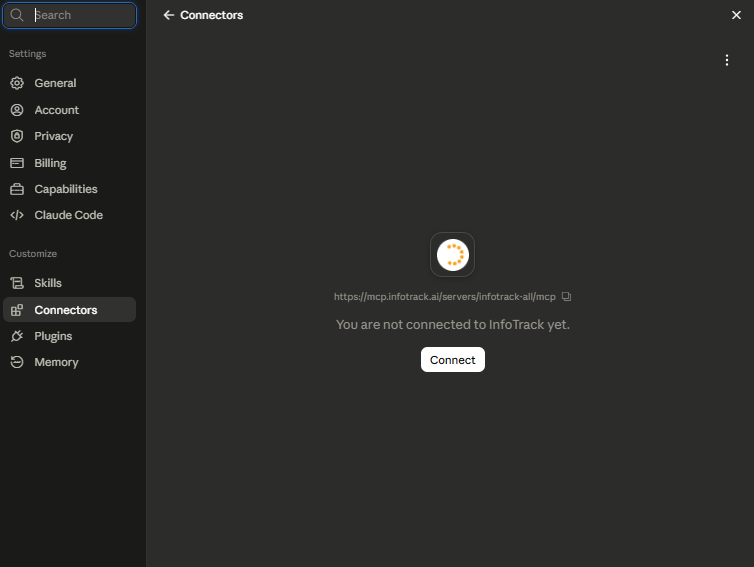
- Once authorised, your InfoTrack tools load automatically and are ready to use.
Need a custom setup or some help? Email AiSolutionsSupport@infotrack.com.au
New to InfoTrack
Create your account today
Not a client yet? Set up an InfoTrack account and accept the terms. Your MCP access activates right away, and you can start placing demo orders you’re ready.
- Terms accepted as part of signup
- Demo searches available immediately
- Live searches roll out as you go
Create an Account
Get started with InfoTrackAI
Simply fill in your details and we will be in touch soon.
Four steps to your first search
01.
Create your account
Sign up and accept the terms. Your MCP access is set up automatically.
02.
Get your MCP URL
Your endpoint is ready to use. If your agent has limited context, use the Search and Invoke endpoint instead.
03.
Connect to Claude
Click the Add to Claude link, press Connect, and sign in with your InfoTrack credentials. Your tools load automatically.
04.
Run a demo search
Use a demo client reference (DEMO-001, DEMO-002, or DEMO-003) to run test orders at no cost. Switch to your own client reference when you’re ready to go live.
Demo searches, free to run
Demo searches behave exactly like live orders but will not incur a cost, so you can build and test your full workflow before placing real orders. Place them under one of the demo client references below.
- Always use a demo client reference
Demo orders only work under one of these references. Use any other reference and the order runs live and you will be charged.
DEMO-001
DEMO-002
DEMO-003
Ask your agent one of:
Run a title search for title reference 1863/1000001
Get an on-file ASIC extract for Hancock Prospecting Pty Limited, ACN 008 676 417
Run a PPSR organisation search for Hancock Prospecting Pty Limited, ACN 008 676 417
Your agent discovers the available tools, selects the right one, and confirms any cost with you before placing an order. The full set of valid test inputs is below.
Full set of valid test inputs
Title search Land title lookup by title reference.
| Test input | Reference |
|---|---|
|
Demo title reference |
1863/1000001 |
ASIC organisation extract Organisation extract current & historical
The extract type is an argument that changes the result. Most test entities are available on-file; some also support current and historical.
| Organisation | ACN | Extract type |
|---|---|---|
|
A.C.M.E. Pty. Ltd |
051 954 940 |
on-file |
|
JB Hi-Fi Group Pty Ltd |
093 114 286 |
on-file |
|
Hancock Prospecting Pty Limited |
008 676 417 |
on-file, current & historical |
|
John Holland Pty. Limited |
004 282 268 |
on-file |
|
Bunnings Building Supplies Pty. Ltd. |
008 672 179 |
current & historical |
PPSR search Organisation grantor search
| Organisation | Identifier |
|---|---|
|
Hancock Prospecting Pty Limited |
ABN 69 008 676 417 |
|
Bunnings Building Supplies Pty. Ltd. |
ACN 008 672 179 |
Ready to test?
Start with a cached demo search today
Create an Account
Get started with InfoTrackAI
Simply fill in your details and we will be in touch soon.
FAQs
No. Use your InfoTrack account to access the shared MCP endpoint and test with cached demo searches. No staging account or staging endpoint is required.
No. Cached demo searches return prepared sample results for onboarding and testing. Live searches use current data and are billed through your InfoTrack account.
After your InfoTrack account is active and your connector is set up, you can order live searches through your account when you need current results.
You need your InfoTrack MCP URL, your InfoTrack API key, and access to Claude custom connectors.
An Owner or Primary Owner may need to add the connector for the organisation first. Individual users can then connect and enable it in their own Claude workspace.
Your clients can create their own API keys and use the shared MCP endpoint. You can keep building and testing while any partner or revenue-share agreement is handled separately.
Most users can start with the shared MCP endpoint. A dedicated endpoint is created for partners who need customised tooling or revenue-share arrangements after the commercial agreement is complete.

Connecting AI Agents and government services through trusted innovation.
© 2026 InfoTrack Australia. All rights reserved.