
Get in Touch
Learn more about InfoTrackAI
Simply fill in your details and we will be in touch soon.
Access trusted Australian data directly in Copilot
InfoTrack MCP connects Microsoft Copilot to verified property, company and compliance searches, so your team can order and review authoritative results inside the AI assistant they already use, with every action approved, logged and billed through your InfoTrack account.
Book a Demonstration
Learn more about Copilot
Simply fill in your details and we will be in touch soon.
Watch Demonstration
What can you do with InfoTrack in Copilot?
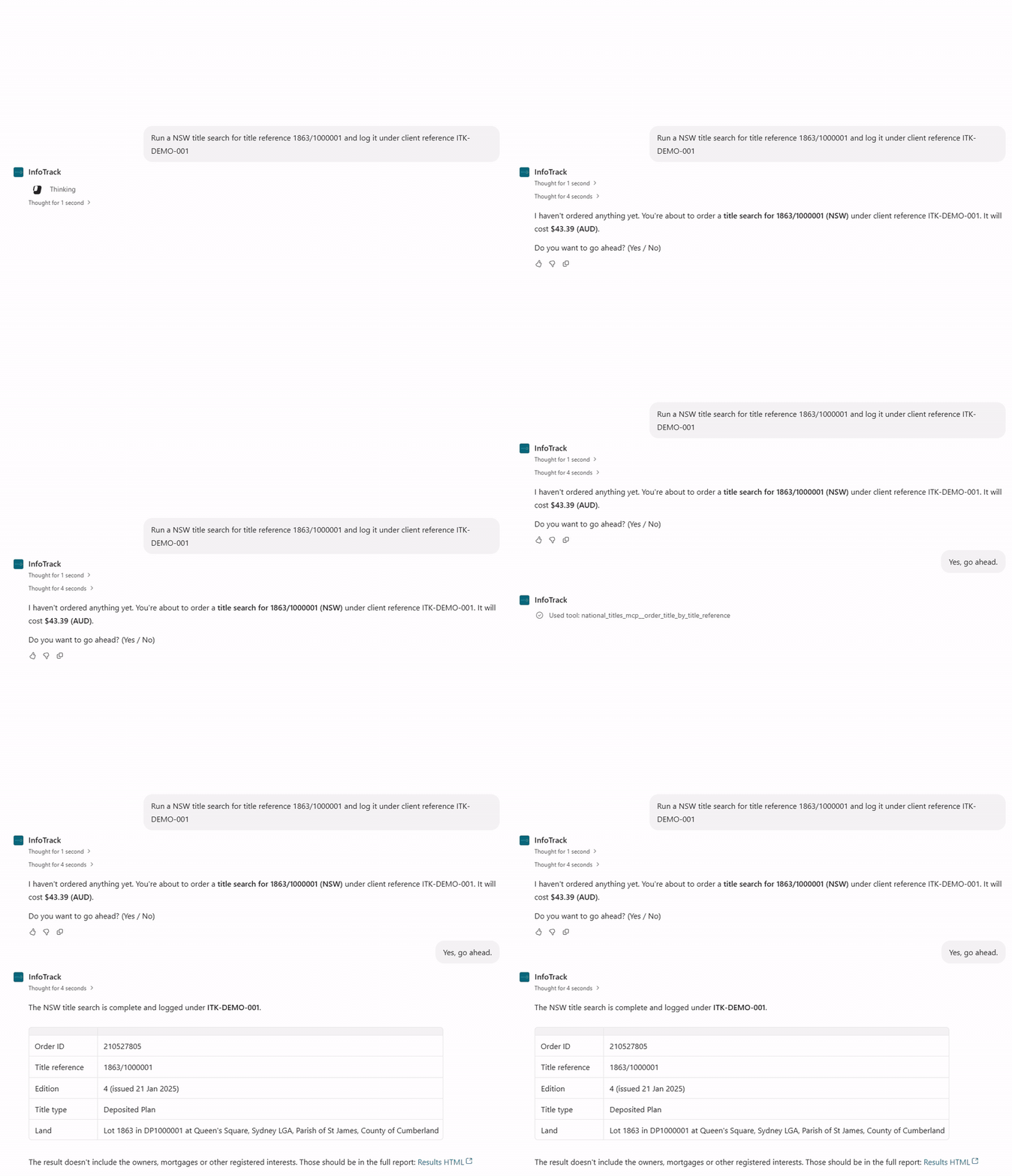
With InfoTrack MCP connected, you can ask Copilot to find, order and explain verified searches in plain language, and Copilot confirms the cost with you before any order is placed.
Services
16
- Search and order tools
80+
- Title coverage
All states
- Test searches
Free
Title, ASIC and PPSR prompts below already include a test client reference (DEMO-001, DEMO-002 or DEMO-003). Keep that reference in your prompt to get sample results at no cost while you learn how it works. Any other client reference places a live order, which Copilot prices and confirms with you first.
What can you order through InfoTrack in Copilot?
InfoTrack’s MCP servers give Copilot access to a number of relevant services. Choose a category to see what each service does and an example prompt to try.
- Property and title >
- Company and credit >
- AML, KYC and risk >
- Contracts and settlement >
- Valuations and vehicles >
National titles
Title searches by address, owner name or title reference, plus historical titles, plans, document images, dealings and sub-folio enquiries.
Property enquiries
Build a list of council and authority certificates for a NSW property and order the ones you need.
Title alerts
Monitor titles and receive email notifications when a dealing is lodged.
Section 10.7(2) planning certificate
Issued under the Environmental Planning and Assessment Act 1979, showing zoning, planning policies and development controls, and where relevant road widening and heritage areas.
ASIC
Company and individual searches, with current, historical and relational organisation extracts.
PPSR
Grantor searches for individuals and organisations, showing registrations, secured parties and collateral, with search certificates.
Check for and order ASIC published notices for a company.
Bankruptcy
Personal insolvency searches on AFSA’s National Personal Insolvency Index, with record extracts.
AML and KYC onboarding
Verify individuals, sole traders, companies, trusts and government entities, manage directors and beneficial owners, and send the client verification link.
Risk screening
Sanctions, PEP and adverse media screening for individuals and organisations, with monitoring and risk reports.
Ultimate beneficial ownership
UBO reports for an entity, retrieved by order.
Section 10.7(2) planning certificate
Issued under the Environmental Planning and Assessment Act 1979, showing zoning, planning policies and development controls, and where relevant road widening and heritage areas.
Contract review
AI review of an uploaded contract, returning a property summary, full analysis and a report.
Contract preparation
Prepare a NSW contract for sale and order the prescribed certificates for the title.
Section 47 clearance certificates
Request Revenue NSW clearance certificates through a draft, review and submit process.
Electronic signing
Client authorisation forms, section 66W certificates and trust authority orders, signed through InfoSign or Docusign.
Property valuation
Automated valuation model reports based on CoreLogic data, matched by address.
Vehicle data
RedBook lookups by registration or VIN, with vehicle valuation reports.
How to order a report in Copilot
Simply describe what you need in plain language, review the cost and approve your order. Copilot will retrieve the relevant information through InfoTrack.

Create or sign in to your account
New users can create an InfoTrack account to get started. Existing customers can sign in using their current InfoTrack credentials.
Generate your API key
Sign in to InfoTrack, open Manage API keys and generate a new key to securely connect your account to Copilot.
Add InfoTrack to Copilot
Try a free search using ITK-DEMO-001, ITK-DEMO-002 or ITK-DEMO-003. Switch to your own client reference when you’re ready to order.
Run a demo search
Use DEMO-001, DEMO-002 or DEMO-003 to run test orders at no cost, then switch to your own client reference when you are ready to go live.









Create or sign in to your account
New users can create an InfoTrack account to get started. Existing customers can sign in using their current InfoTrack credentials.
Generate your
API key
API key
Sign in to InfoTrack, open Manage API keys and generate a new key to securely connect your account to Copilot.
Add InfoTrack
to Copilot
to Copilot
Your Microsoft 365 administrator connects InfoTrack through Copilot Studio, making trusted InfoTrack searches available to authorised users within your organisation.
Run a demo search
Try a free search using ITK-DEMO-001, ITK-DEMO-002 or ITK-DEMO-003. Switch to your own client reference when you’re ready to order.
Your next search can start in Copilot
Your next search can start in Copilot
Book a Demonstration
Learn more about Copilot
Simply fill in your details and we will be in touch soon.
Built with compliance at its core
Access InfoTrack’s trusted data through Copilot, with the security, human oversight and traceability your firm expects.
Authoritative data, not guesswork
Access verified government and registry information, including property titles, ASIC and PPSR records.
You approve every order
Review search costs and approve orders before Copilot retrieves information through InfoTrack.
Clear, auditable records
Maintain visibility over searches, approvals and actions with records that support your firm's oversight and accountability.
Built on proven security standards
InfoTrack MCP operates under ISO 27001 and ISO 9001 aligned controls, extending the compliance frameworks your firm already trusts into AI-enabled work.

Who uses InfoTrack in Copilot?
- Law firms
Run ASIC, PPSR, bankruptcy and risk checks on a counterparty, then summarise the results into a file note in Word.
- Conveyancers
Order title searches, plans, NSW property certificates and Section 47 clearance certificates the moment a contract arrives in Outlook.
- Real estate professionals
Check title and plan details and order an automated property valuation report before a property is listed.
- Financial institutions
Complete AML and KYC verification, sanctions and PEP screening, PPSR searches and UBO reports in one conversation.
Give Copilot the data your matters depend on
Connect Microsoft Copilot to InfoTrack today and run your first demo search at no cost.
Book a Demonstration
Learn more about Copilot
Simply fill in your details and we will be in touch soon.
Frequently asked questions about InfoTrack in Copilot
Answers on reports, costs, coverage and how your order works.
Model Context Protocol (MCP) is an open standard that lets AI tools such as Microsoft Copilot connect securely to external services. InfoTrack MCP uses it to give Copilot controlled access to verified Australian searches.
No. Existing clients connect using their current InfoTrack account and an API key, and new clients can create an account with MCP access activated at sign-up.
No. Copilot confirms the search and its cost with you before an order is placed, and your firm defines what Copilot can access and when a person must approve the next step.
Live searches are billed through your InfoTrack account in the same way as searches ordered through the InfoTrack platform. Demo searches under DEMO-001, DEMO-002 or DEMO-003 incur no cost.
Your Microsoft 365 or Copilot Studio administrator typically registers InfoTrack as a tool for your organisation, after which practitioners can use it within Copilot.
Title searches cover all Australian states. Contract preparation, property certificates and Section 47 clearance certificates are NSW only, and title alerts cover NSW and Victoria.
InfoTrack MCP operates under ISO 27001 and ISO 9001 aligned controls, and every interaction between Copilot and InfoTrack is permissioned and logged.

Connecting AI Agents and government services through trusted innovation.
© 2026 InfoTrack Australia. All rights reserved.